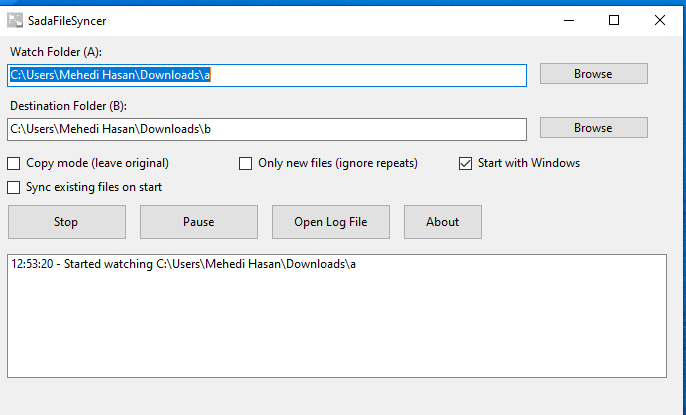
SadaFileSyncer is a modern Windows Forms application designed to automatically watch a source folder and sync files to a destination folder in real-time. It supports both moving and copying files, with options for startup integration and background operation.
Features
- Real-time Folder Monitoring: Watches a specific “Watch Folder” and automatically processes new files as soon as they appear.
- Flexible Sync Modes:
- Move Mode: Moves files from source to destination (default).
- Copy Mode: Copies files to destination, keeping the original in the source.
- Smart Processing:
- Only New Files: Option to ignore files that have already been processed to prevent duplicates (tracks processed files in the current session).
- Sync Existing Files: Optionally syncs all files currently in the watch folder when the application starts.
- Background Operation:
- System Tray Support: Minimizes to the system tray to keep your taskbar clean.
- Close to Tray: Closing the window keeps the app running in the background.
- Context Menu: Quick access to Show, Pause/Resume, Open Logs, and Exit from the tray icon.
- Auto-Start: Can be configured to start automatically with Windows.
- Activity Logging: Keeps a detailed history of all actions (Moved/Copied/Errors) visible in the UI and saved to a log file.
- Log location:
%LocalAppData%\SadaFileSyncer\logs\activity.log
- Log location:
- Pause/Resume: Temporarily stop watching without closing the application.
Getting Started
- Select Folders:
- Watch Folder (A): The folder to monitor for incoming files.
- Destination Folder (B): The folder where files will be sent.
- Configure Options:
- Check Copy mode to keep files in the source folder.
- Check Only new files to avoid re-processing files in the same session.
- Check Start with Windows to run automatically on boot.
- Check Sync existing files on start to process files monitoring began.
- Start Syncing: Click the Start button. The app will begin watching.